EnhancedVehicle v1.6.3.0 Mod
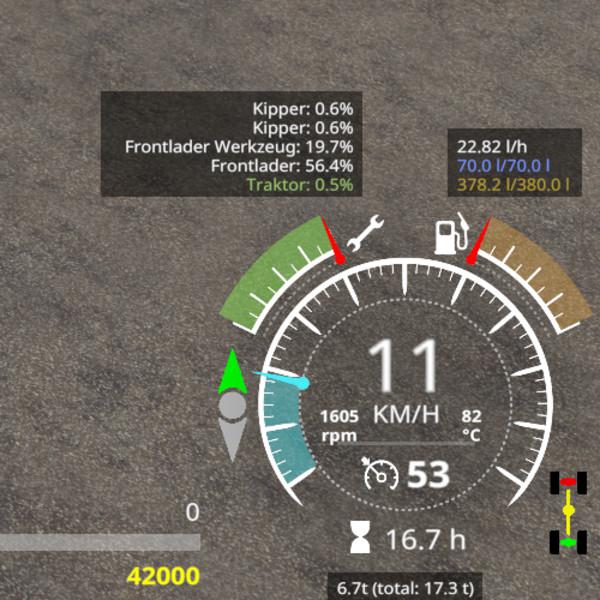
EnhancedVehicle v1.6.3.0 Mod This mod extends (engine-based) vehicles with differential locks and drive modes (four-wheel-drive, rear/front wheel drive). 2019-01-20 – V1.6.3.0 * updated to support the migration of KeyboardSteer to VehicleControlAddon (vca) 2019-01-15 – V1.6.2.0 * talked to Mogli12 about compatibility between EV and KS and instead of disabling other mods functions the player (thats you) should decide which mods Shuttle Control/Shift should be used to comply to that EV will no longer disable stuff, but display an annoying warning text on screen to instruct you how to proceed choosing a shuttle control/shift + added global options to enable/disable shuttle shift, differentials and hydraulics + added functions for other mods to enable/disable EnhancedVehicle functions + the “beep beep” is back 2019-01-14 – V1.6.1.0 + added functionality to turn on/off both differentials the same time (no default keybinding) 2019-01-14 – V1.6.0.2 * adapt KS integration to new version 2019-01-13 – V1.6.0.1 + added french translation (thanks boloss) * changed the way the hydraulic stuff works. should now work on most machinery * changed how we setup actionEvents and InputBindungs * another change in integration of KS camera stuff 2019-01-12 – V1.6.0.0 + implemented four new keybindings for hydraulic front+rear up/down and on/off (default: lAlt+1 to 4) 2019-01-11 – V1.5.1.2 * (shuttle shift) better integration with keyboardSteer. backward looking camera should work again * (shuttle shift) changed behavior: when vehicle moves (without throttle) and opposite direction is selected it will brake * (shuttle shift) bugfix for those damn vehicles with build-in reverse driving mechanism 2019-01-08 – V1.5.0.0 + implemented shuttle shift functionality (per vehicle). press assigned key (default: Space) to change driving direction and (default: LCTRL+Space) to turn shuttle shift on/off + shuttle shift status per vehicle is stored in savegame + added shuttle shift status display left of speedMeter. The green arrow shows the selected driving direction. If shuttle shift is disabled the display turns gray-transparent. + added global option “shuttleDefaultIsOn” to choose whether shuttle shift is ON per default when entering “new” vehicles (default: OFF) * moved differential status display to right-bottom corner of speedMeter Version 1.4.1.0 * reworked HUD elements positioning. should fix positions once and for all regardless of screen resolutions and GUI scaling (press “KeyPad /” to adept) * workaround (it displays “0”) for attachments without a damage model (no spec_wearable) * changed the differential behavior for 2WD. this may cause some wobbly side effects on most vehicles but it’s more correct now Version 1.4.1.0 * reworked HUD elements positioning. should fix positions once and for all regardless of screen resolutions and GUI scaling (press “KeyPad /” to adept) * workaround (it displays “0”) for attachments without a damage model (no spec_wearable) * changed the differential behavior for 2WD. this may cause some wobbly side effects on most vehicles but it’s more correct now Version 1.4.0.0 * fixed warning about the background overlay image (png -> dds) + config is now stored in XML file + position of HUD elements can be moved or enabled/disabled in XML file * rewrote the key binding/key press stuff + key bindings can now be changed in the options menu + added config reset functionality and keybinding. use this if you messed up the XML or changed the GUI scale + if mod ‘keyboardSteerMogli’ is detected we move some HUD elements to let them not overlap * moved the rpm and temperature HUD elements inside the speedmeter * don’t display not working HUD elements as a multiplayer (and not being host) client In addition, the HUD will be upgraded with some more detailed damage report, fuel tank level, fuel consumption, engine speed and temperature, and a weight/total weight display. keyboard mapping (can be changed in the game options menu) KeyPad 7 – enable/disable front axle differential lock KeyPad 8 – enable/disable back axle differential lock KeyPad 9 – switch wheel drive mode between 4WD (four wheel drive) or 2WD (two wheel drive) KeyPad / – reset HUD positions. use this if you messed up the XML config, changed the GUI scale or installed keyboardSteer from Mogli afterwards. (version 1.4.0.0+ required) If the mod “keyboardSteer” from Mogli is detected, some HUD elements are moved a bit to avoid overlapping. Press “KeyPad /” to reset their positions. (version 1.4.0.0+ required) Please note: Due to limitations and bugs in the game engine, the HUD data for fuel consumption, engine temperature and weight are not available or incorrect for all multiplayer players – with the exception of the host.
Download Links
Report a problem
EnhancedVehicle v1.6.3.0 Mod
Advertisement
Remove ads