Euro Truck Simulator 2 mods
177,637 results- 15 per page
- 30 per page
- 45 per page
- 60 per page
-
See more per page
Bigger pages, fewer clicks - and no ads anywhere.
Go Pro

Project “RusMap” 2.60.1
Project “RusMap” – Global modification for the game Euro Truck Simulator 2. This modification has been developed since 2014 and covers the European part of Russia and the Republic of Belarus. The following regions are represented in Russia: In the north – Moscow, Leningrad, Tver, Novgorod, Pskov, Murmansk and the Republic of Karelia. In the west – Kaluga, Bryansk, Smolensk, Tula, Oryol, Kursk, Belgorod. In the south – Voronezh, Tambov, Penza, Lipetsk, Saratov and Volgograd regions. In the Republic of Belarus, six regions are represented: Minsk, Vitebsk, Mogilev, Gomel, Grodno and Brest regions. The map is compatible with other popular projects such as ProMods, Roextended Map, SibirMap, Southern Region Map, Volga Map and many other modifications. Cities in Russia: Lyuban, Kirovsk, Bryansk, Valdai, Velikiye Luki, Veliky Novgorod, Velizh, Volokolamsk, Vyshny Volochok, Vyazma, Kaluga, Klin, Moscow, Nevel, Obninsk, Ostashkov, Porkhov, Rzhev, Roslavl, Smolensk, Tver, Kholm, Yukhnov, Tula, Kursk, Orel, Voronezh, Kolomna, Tambov, Borisoglebsk, Volgograd, Volzhsky, Krasnoslobodsk, Saratov, Engels, Lodeynoye Pole, Petrozavodsk, Medvezhyegorsk, Kem, Zelenoborsky, Sortavala, Priozersk, Suoyarvi, Tosno, Razmetelyevo, Murmansk, Monchegorsk, Kandalaksha, Segezha, Alakurtti, Kolpino, Kola, Khimki, Vitino. Cities in the Republic of Belarus: Cities in the Republic of Belarus: Baranovichi, Bobruisk, Brest, Vitebsk, Gomel, Minsk, Mogilev, Mozyr, Mstislavl, Orsha, Pinsk, Slutsk, Lida, Grodno, Slonim, Volkovysk, Polatsk, Glubokoe. List of changes in version 2.60.1 The city of Petrozavodsk has been completely rebuilt. A new road, 86K-215, has been added. Minor changes have been made to road R-21. New models, prefabs, signs, and markers have been added. Errors from the previous version have been fixed.

INTERNACIONAL 9800I V 1.60
2 Cabin Options – 2 Chassis Options – 32 Engine Options – 7 Transmission Options – 3 Skin Options – Paintjob Options – Tuning Options Tested for 1.60 game version Credits: odd_fellow, Harven, Lucasi, Pauly If the download link is outdated or doesn't work, you can add your download link. (If your link is valid, we will approve it within 24 hours.)

Longer Yellow Lights v1.0
The Longer Yellow Lights Mod extends the yellow light duration in Euro Truck Simulator 2. This gives you more time to react safely before the light turns red, reducing sudden braking and making city driving feel smoother and more realistic. It is especially useful when driving heavy trucks and trailers. Perfect for players who want a more natural traffic flow and a more immersive driving experience.

Realistic Fuel Economy v1.0
The Realistic Fuel Economy Mod improves fuel consumption in Euro Truck Simulator 2 to make driving feel more realistic and immersive. Your driving style, speed, engine power, cargo weight, and acceleration have a greater impact on fuel usage. Smooth and efficient driving is rewarded, while aggressive acceleration, high speeds, and heavier loads can increase consumption. This mod is ideal for players who want a more believable trucking experience, better fuel management, and more realistic long-distance journeys.
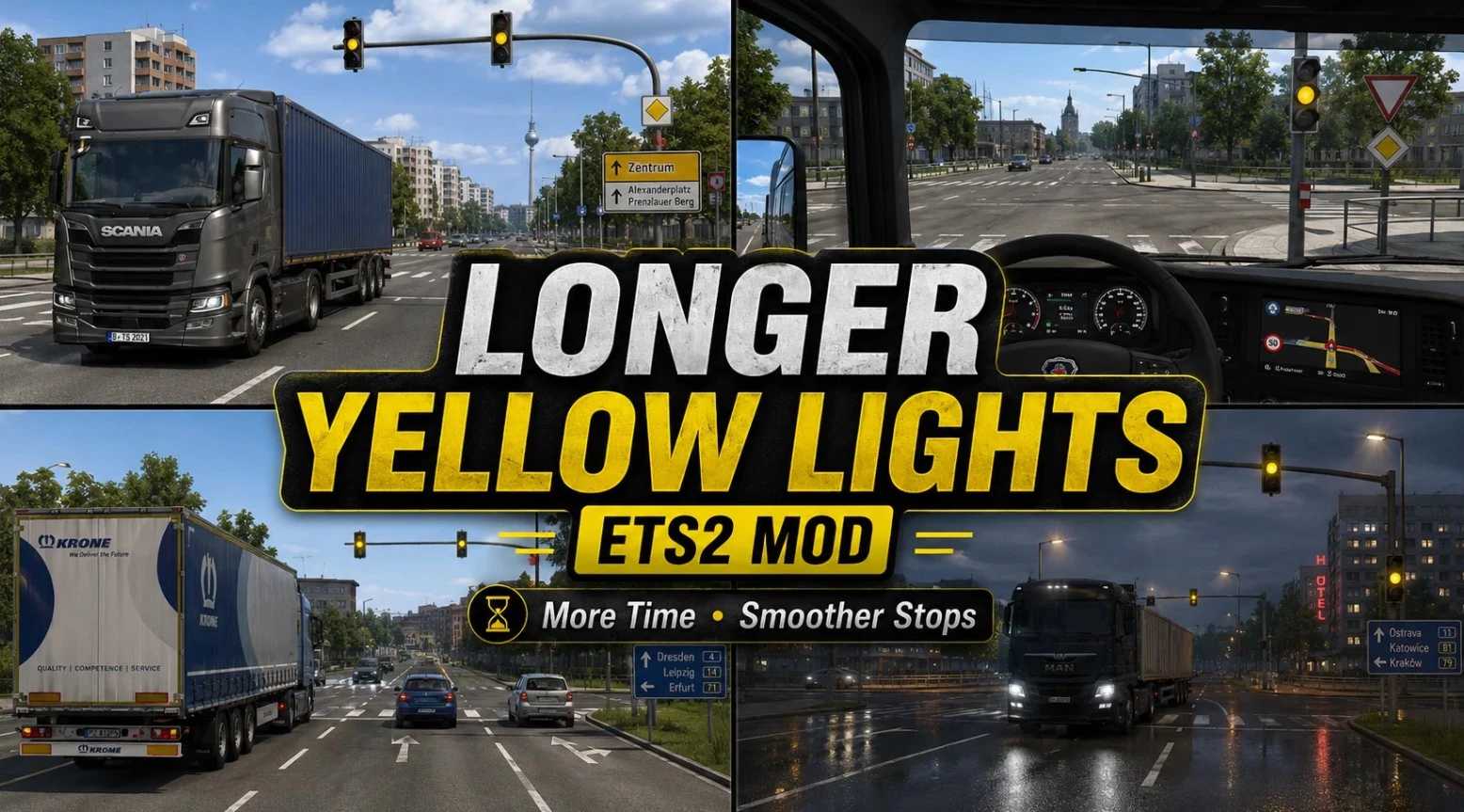
Dłuższe żółte światła v1.0 ETS2
Dłuższe żółte światła v1.0 ETS2 Modyfikacja Longer Yellow Lights wydłuża czas trwania żółtego światła w grze Euro Truck Simulator 2. Dzięki temu masz więcej czasu na bezpieczną reakcję, zanim światło zmieni się na czerwone, co zmniejsza ryzyko nagłego hamowania i sprawia, że jazda po mieście staje się płynniejsza i bardziej realistyczna. Jest to szczególnie przydatne podczas prowadzenia ciężkich samochodów ciężarowych i przyczep. Idealne dla graczy, którym zależy na bardziej naturalnym przepływie ruchu i bardziej wciągających wrażeniach z jazdy.
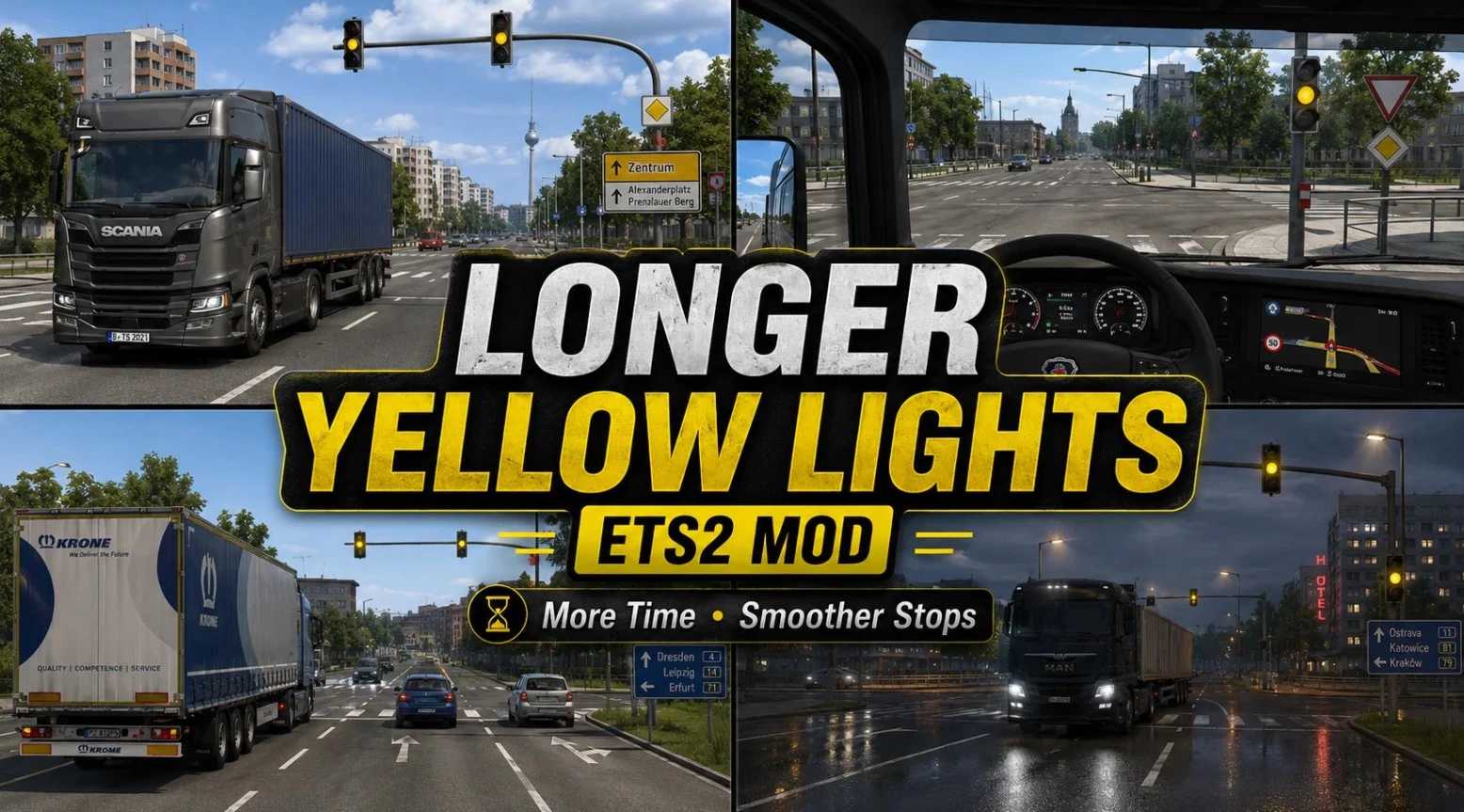
Feux jaunes plus longs v1.0 ETS2
Feux jaunes plus longs v1.0 ETS2 Le mod « Longer Yellow Lights » allonge la durée du feu jaune dans Euro Truck Simulator 2. Cela vous donne plus de temps pour réagir en toute sécurité avant que le feu ne passe au rouge, réduisant ainsi les freinages brusques et rendant la conduite en ville plus fluide et plus réaliste. Il est particulièrement utile pour la conduite de camions et de remorques lourds. Idéal pour les joueurs qui souhaitent une circulation plus naturelle et une expérience de conduite plus immersive.

Volvo 2015 CLAUDIO 1.60
Description: Includes 1 Cabin 2 Chassis 4 Engines 3 interiors Transmissions Alots of accessories DOWNLOAD https://modsfire.com/N5SeW98811Bn8JN

RusMap v2.60.1
Description: The following regions are represented in Russia: In the north – Moscow, Leningrad, Tver, Novgorod, Pskov, Murmansk and the Republic of Karelia. In the west – Kaluga, Bryansk, Smolensk, Tula, Oryol, Kursk, Belgorod. In the south – Voronezh, Tambov, Penza, Lipetsk, Saratov and Volgograd regions. In the Republic of Belarus, six regions are represented: Minsk, Vitebsk, Mogilev, Gomel, Grodno and Brest regions. The map is compatible with other popular projects such as ProMods, Roextended Map, SibirMap, Southern Region Map, Volga Map and many other modifications. List of changes in version 2.60.1: The city of Petrozavodsk has been completely rebuilt. A new road, 86K-215, has been added. Minor changes have been made to road R-21. New models, prefabs, signs, and markers have been added. Errors from the previous version have been fixed. DOWNLOAD RusMap_v.2.60.1.7z – 1.5 GB

DAF XF95 v1.4
Description: Features: – High quality exterior and interior providing the highest levels of immersion. – Has own sounds from famous Engine Voice Records (EVR) (currently used EVR’s XF105 sounds) and wide range of engines from E2 and E3 era and each of them sounding slightly differently. – Classic 3 cabin types and 6 unique chassis from real life variants of the truck. – Big array of customization (Collectively around 430 parts) for all parts of the truck. cabins and chassis of the truck. Even more customization for interior – different panels, seats, beds and even different speedometers will allow you to create a truck for your own taste and give it unique personality. – Made with high attention to detail, high quality while maintaining the best optimization for game engine. Mod weights only ~40MB and is developed with best practices of the official developers. DLC & SiSL Addons, Template Included Credits: Soundwave2142 DOWNLOAD https://modsfire.com/wrxZ8tz22stA2v0

Truck Mod Manager v5.2.0
Description: Truck Manager is an all-in-one desktop tool designed for Euro Truck Simulator 2 and American Truck Simulator players. It provides an easier and more organized way to manage your game, profiles, mods and saves without having to manually edit multiple files. Main features include: * ETS2 and ATS support * Automatic game and profile detection * Local and Steam Workshop mod management * Drag & drop mod load order * Mod categories for easier organization * Save and profile management * Custom Job Dispatcher * Profile Editor * Multiple language support * Preset and mod configuration management * Support for custom `-homedir` installations * Automatic update system * Modern and easy-to-use interface Truck Manager is continuously being developed with new tools and features aimed at making ETS2 and ATS management faster and easier. Developed by Cortex Studios. Credits: ComPanda & Cortex Studios DOWNLOAD ETS2ModManager.rar – 35.3 MB

Conjunto Scania Baú IMCASALI Juninho 1.60
Description: Ownable 5 Paintjob Paintable Trailer Cables Advenced Coupling Liftable Axle Standalone SCS Cargoes All Textures were made by AO Render Compatiple With All DLC DOWNLOAD https://modsfire.com/qsdaj5br2RwK0SB DOWNLOAD https://modsfire.com/adw543u8X5uLMon
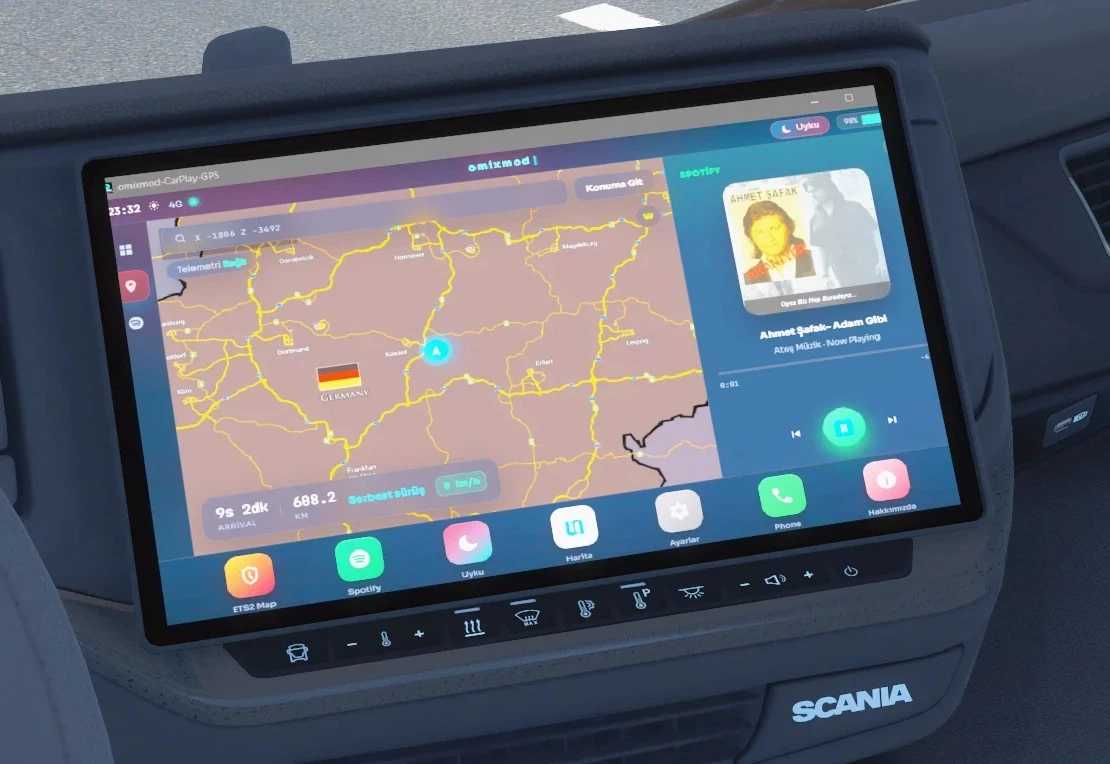
Samochód Lancer v1.0 ETS2
Samochód Lancer v1.0 ETS2 Przewodnik po konfiguracji Cel: Skonfiguruj raz, a następnie uruchamiaj plik START.bat za każdym razem. Menu Prism w grze należy skonfigurować tylko podczas początkowej konfiguracji. Pobierz i rozpakuj plik zip Zapisz plik zip, korzystając z linku „Bezpłatne pobieranie” powyżej. Kliknij prawym przyciskiem myszy → Wypakuj wszystko. W folderze powinien pojawić się następujący plik: KURULUM.bat Zobaczysz również pliki START.bat, plugins-install i program. Nie uruchamiaj plików bezpośrednio z archiwum ZIP; najpierw je rozpakuj. Kliknij dwukrotnie KURULUM.bat Ten kreator wykonuje następujące kroki w podanej kolejności: Lokalizuje folder wtyczek ETS2 Kopiuje tam pliki PrismTextureStreamerFB Otwiera stronę pobierania, jeśli brakuje Node.js Instaluje Electron (npm install — za pierwszym razem może to potrwać kilka minut) Uruchamia okno CarPlay (opcjonalnie) Wskazówka: Jeśli system Windows wyświetli ostrzeżenie „nieznany wydawca”, wybierz opcję „Więcej informacji” → „Uruchom mimo to”. Pozostaw otwarte okno CarPlay Na pasku tytułu powinien znajdować się napis „omixmod-CarPlay-GPS”. W tym oknie wyświetlany jest obraz przesłany do GPS-a. Ważne: Nie minimalizuj okna. Zminimalizowanie go zatrzymuje renderowanie, powodując zamrożenie obrazu GPS na ostatniej klatce. Możesz zachować jego rozmiar na małym obszarze ekranu, ale nie minimalizuj go do paska zadań. Podłącz Prism do ETS2 raz Uruchom grę i wejdź do kabiny ciężarówki (tak, aby deska rozdzielcza była widoczna). Następnie: Otwórz menu Prism za pomocą Ctrl + F8 Dodaj ekran → Typ: GPS Okno źródłowe: omixmod-CarPlay-GPS (electron) Stosować Spójrz na ekran GPS w centrum ciężarówki, a nie na unoszący się w powietrzu sześcian. Jeśli obraz wydaje się odwrócony do góry nogami, włącz opcję „Odwróć w pionie” w ustawieniach Prism. Następne napędy Wystarczy wykonać konfigurację tylko raz. Następnym razem: Uruchom CarPlay za pomocą pliku START.bat (nie minimalizuj) Uruchom ETS2 — ustawienia Prism pozostają zapisane Informacje o utworze pojawiają się, jeśli Spotify jest otwarty Aby uzyskać dostęp do ustawień, koloru motywu, multimediów w trybie uśpienia i opcji „Informacje”, skorzystaj z opcji Ustawienia / Informacje w stacji dokującej.
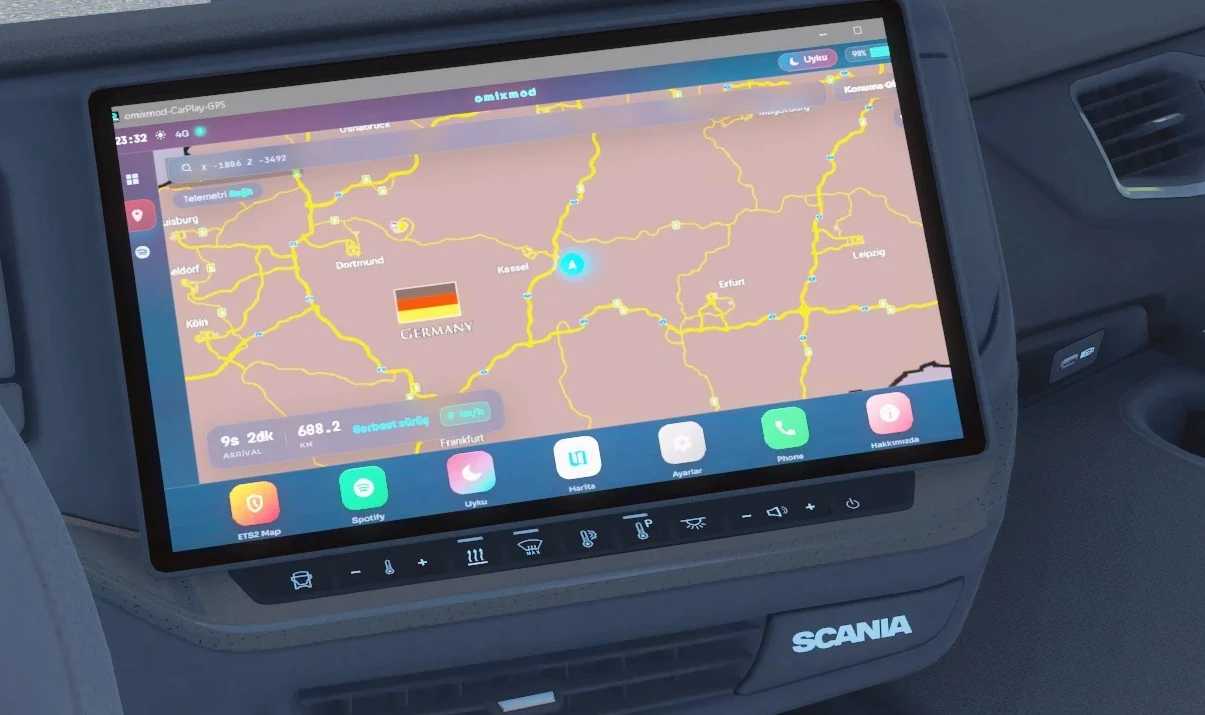
Lanceur de voitures v1.0 ETS2
Lanceur de voitures v1.0 ETS2 Guide d'installation Objectif : Configurer le tout une fois, puis lancer simplement START.bat à chaque fois. Il suffit de configurer le menu Prism dans le jeu lors de la configuration initiale. Téléchargez et extrayez le fichier zip Enregistrez le fichier zip en utilisant le lien « Téléchargement gratuit » ci-dessus. Faites un clic droit → Extraire tout. Vous devriez voir le contenu suivant dans le dossier : KURULUM.bat Vous trouverez également les fichiers START.bat, plugins-install et program files. Ne les exécutez pas directement depuis l'archive ZIP ; extrayez-les d'abord. Double-cliquez sur KURULUM.bat Cet assistant effectue les étapes suivantes dans l'ordre : Localise le dossier des plugins ETS2 Copie les fichiers PrismTextureStreamerFB à cet emplacement Ouvre la page de téléchargement si Node.js est manquant. Installe Electron (npm install — cela peut prendre quelques minutes la première fois) Ouvre la fenêtre CarPlay (facultatif) Conseil : Si Windows affiche un avertissement « éditeur inconnu », sélectionnez « Plus d’infos » → « Exécuter quand même ». Gardez la fenêtre CarPlay ouverte. La barre de titre doit afficher « omixmod-CarPlay-GPS ». Cette fenêtre affiche l'image envoyée au GPS. Important : Ne réduisez pas la fenêtre. La réduction interrompt le rendu, ce qui provoque le blocage de l’affichage GPS sur la dernière image. Vous pouvez la réduire à une petite zone de l’écran, mais ne la réduisez pas dans la barre des tâches. Connectez Prism dans ETS2 une seule fois Lancez le jeu et entrez dans la cabine du camion (pour que le tableau de bord soit visible). Ensuite : Ouvrez le menu Prism en utilisant Ctrl + F8 Ajouter un écran → Type : GPS Fenêtre source : omixmod-CarPlay-GPS (electron) Appliquer Regardez l'écran GPS au centre du camion, et non le cadre flottant. Si l'image apparaît à l'envers, activez l'option « Retourner verticalement » dans les paramètres de Prism. disques suivants Il suffit d'effectuer la configuration une seule fois. La prochaine fois : Lancez CarPlay à l'aide du fichier START.bat (ne pas réduire). Lancez ETS2 — le paramètre Prism reste sauvegardé Les informations sur la chanson s'affichent si Spotify est ouvert. Pour accéder aux paramètres, à la couleur du thème, aux médias en veille et à la section « À propos », utilisez l’option Paramètres / À propos dans le dock.

Scania S Longline v1.7 1.60
Description: Changelog v1.7 -Fixed crash issues -Added missing wipers models, materials -Added side mirrors -Adapted the truck to latest 1.60.x patch Comes with: 1 Custom Interior for Eu and Uk in 11 variants of colors 2 steeringwheels in 22 variants of colors 7 colors of interior lights 5 interior backwall logos in 11 variants of colors BDF, Singletag Chassis Own Tuning options: Seats in 23 variants of colors Dashboard table in 26 variants of colors Animated side windowsticker and front glass sticker Shifter option in 12 variants of color 2 Sidebars with slots All parts for Eu and Uk version Requires SCS Scania Mighty Griffin DLC Compatibility: 1.60 DOWNLOAD https://modsfire.com/78Ks5v3aZOj89Nh

SJMap v8 1.60
Description: Changelog V8 updated for 1.60+ added Raoul Island Station improved Camp Barneo fixed bugs and stuff This map is mostly a side project and thus focuses more on being fun rather than absolute realism. Features: Jan Mayen Svalbard (Ny-Ålesund) Hornsund Camp Barneo some roads compatibility: ETS2 1.60+ every map DLC is required (probably) likely compatible with most map mods ProMods Compatibility made possible by hi sora’s fix DOWNLOAD https://modsfire.com/7Hn1Io36O9v4qva
- 15 per page
- 30 per page
- 45 per page
- 60 per page
-
See more per page
Bigger pages, fewer clicks - and no ads anywhere.
Go Pro