1 / 3
Omixmod CarPlay v2.0.0 — ETS2 Cabin GPS ( Fixed ) New Version
omixmod CarPlay v2.0.0 — ETS2 Cabin GPS
Window title (must stay exactly this): omixmod-CarPlay-GPS
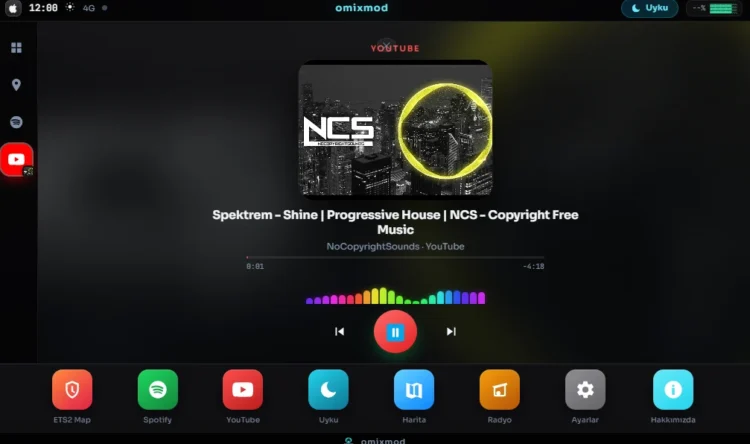
Live CarPlay-style GPS on the truck screen: close-up 3D map, blue route, Spotify / YouTube now playing, sleep screen (image / GIF / video / YouTube).
Euro Truck Simulator 2 kabin GPS’ine CarPlay tarzı arayüz basar. Harita oyun GPS’i gibi yakın ve eğiktir, mavi rota yolları takip eder. Müzik PC’de çalan Spotify veya YouTube’dan gelir.
Gereksinimler
ETS2 (64-bit)
Node.js LTS (ilk kurulumda npm install için)
Zip içindeki PrismTextureStreamerFB (KURULUM.bat kopyalar)
Klasöre çıkar.
KURULUM.bat dosyasına çift tıkla.
Prism, ETS2 binwin_x64plugins altına kopyalanır.
Node yoksa tarayıcı açılır; LTS kur, sonra kurulumu tekrar çalıştır.
İlk seferde Electron indirilir (birkaç dakika sürebilir).
ETS2’yi aç, kabine gir.
Oyunda Ctrl+F8 → Add Screen GPS → kaynak: omixmod-CarPlay-GPS → Apply.
Sonraki seferler: sadece START.bat.
Prism otomatik bulunamazsa elle kopyala:
Euro Truck Simulator 2binwin_x64plugins
PrismTextureStreamerFB.dll (plugins köküne)
PrismTextureStreamerFB klasörü (plugins altına)
Zip’te bunlar plugins-install klasöründedir.
Oyunla birlikte açılsın
AUTO_START.bat çalıştır, veya Win+R → shell:startup → AUTO_START.bat kısayolu koy. ETS2 (eurotrucks2.exe) açılınca CarPlay gelir.
CarPlay penceresini küçültme. Prism son karede donar.
Pencere başlığı omixmod-CarPlay-GPS kalmalı. Değiştirme.
Launcher CMD’yi küçültebilirsin; CarPlay penceresine dokunma.
ReShade d3d11.dll Prism ile çakışabilir. Sorun olursa geçici kapat.
Harita / HUD için telemetri gerekir. Bağlı değilse Ctrl+F8 kaynağını ve plugin’i kontrol et.
Ayarlar’dan iOS / Android görünümü, tema, HUD, uyku medyası (resim, GIF, video, YouTube).
Güncelleme: Ayarlar → Kontrol et. Yeni sürüm zip ile gelir, tema ve uyku dosyaların silinmez.
Yakın 3D GPS haritası, yol takip eden mavi rota
YouTube kenar çubuğu + kapak
Uyku GIF / YouTube düzeltmesi
Daha az FPS kaybı
What is it?
Puts a CarPlay-style UI on the Euro Truck Simulator 2 cabin GPS. Close-up tilted map like the in-game advisor, blue route that follows roads, Spotify / YouTube now playing from Windows, sleep screen.
Requirements
ETS2 (64-bit)
Node.js LTS (needed once for npm install)
PrismTextureStreamerFB (copied by KURULUM.bat)
Installation
Extract the zip.
Double-click KURULUM.bat.
Prism is copied to ETS2 binwin_x64plugins.
Launch ETS2 and sit in the cabin.
In-game Ctrl+F8 → Add Screen GPS → source: omixmod-CarPlay-GPS → Apply.
Next time: just run START.bat.
If Prism is not found automatically, copy manually to:
Euro Truck Simulator 2binwin_x64plugins
PrismTextureStreamerFB.dll (into the plugins folder)
PrismTextureStreamerFB folder (into plugins)
These files are in plugins-install inside the zip.
Start with the game
Run AUTO_START.bat, or Win+R → shell:startup and put a shortcut to AUTO_START.bat. CarPlay starts when ETS2 (eurotrucks2.exe) launches.
Do not minimize the CarPlay window. Prism will freeze on the last frame.
Keep the window title exactly omixmod-CarPlay-GPS.
You may minimize the launcher CMD; do not minimize the CarPlay window.
ReShade d3d11.dll can conflict with Prism. Disable it if the GPS overlay fails.
Map / HUD need telemetry. If it stays offline, check Ctrl+F8 source and that the plugin is loaded.
Settings: iOS / Android skin, themes, HUD, sleep media (image, GIF, video, YouTube).
Updates: Settings → Check. New zip installs without deleting your theme or sleep files.
Close-up 3D GPS map, blue route following roads
YouTube sidebar + cover art
Sleep GIF / YouTube fix
Lower FPS impact
omixmod · PrismTextureStreamerFB is used to draw the window onto the truck GPS mesh.
Do not redistribute as your own work without credit.
Credits:
OmixMod
Window title (must stay exactly this): omixmod-CarPlay-GPS
Live CarPlay-style GPS on the truck screen: close-up 3D map, blue route, Spotify / YouTube now playing, sleep screen (image / GIF / video / YouTube).
Euro Truck Simulator 2 kabin GPS’ine CarPlay tarzı arayüz basar. Harita oyun GPS’i gibi yakın ve eğiktir, mavi rota yolları takip eder. Müzik PC’de çalan Spotify veya YouTube’dan gelir.
Gereksinimler
ETS2 (64-bit)
Node.js LTS (ilk kurulumda npm install için)
Zip içindeki PrismTextureStreamerFB (KURULUM.bat kopyalar)
Klasöre çıkar.
KURULUM.bat dosyasına çift tıkla.
Prism, ETS2 binwin_x64plugins altına kopyalanır.
Node yoksa tarayıcı açılır; LTS kur, sonra kurulumu tekrar çalıştır.
İlk seferde Electron indirilir (birkaç dakika sürebilir).
ETS2’yi aç, kabine gir.
Oyunda Ctrl+F8 → Add Screen GPS → kaynak: omixmod-CarPlay-GPS → Apply.
Sonraki seferler: sadece START.bat.
Prism otomatik bulunamazsa elle kopyala:
Euro Truck Simulator 2binwin_x64plugins
PrismTextureStreamerFB.dll (plugins köküne)
PrismTextureStreamerFB klasörü (plugins altına)
Zip’te bunlar plugins-install klasöründedir.
Oyunla birlikte açılsın
AUTO_START.bat çalıştır, veya Win+R → shell:startup → AUTO_START.bat kısayolu koy. ETS2 (eurotrucks2.exe) açılınca CarPlay gelir.
CarPlay penceresini küçültme. Prism son karede donar.
Pencere başlığı omixmod-CarPlay-GPS kalmalı. Değiştirme.
Launcher CMD’yi küçültebilirsin; CarPlay penceresine dokunma.
ReShade d3d11.dll Prism ile çakışabilir. Sorun olursa geçici kapat.
Harita / HUD için telemetri gerekir. Bağlı değilse Ctrl+F8 kaynağını ve plugin’i kontrol et.
Ayarlar’dan iOS / Android görünümü, tema, HUD, uyku medyası (resim, GIF, video, YouTube).
Güncelleme: Ayarlar → Kontrol et. Yeni sürüm zip ile gelir, tema ve uyku dosyaların silinmez.
Yakın 3D GPS haritası, yol takip eden mavi rota
YouTube kenar çubuğu + kapak
Uyku GIF / YouTube düzeltmesi
Daha az FPS kaybı
What is it?
Puts a CarPlay-style UI on the Euro Truck Simulator 2 cabin GPS. Close-up tilted map like the in-game advisor, blue route that follows roads, Spotify / YouTube now playing from Windows, sleep screen.
Requirements
ETS2 (64-bit)
Node.js LTS (needed once for npm install)
PrismTextureStreamerFB (copied by KURULUM.bat)
Installation
Extract the zip.
Double-click KURULUM.bat.
Prism is copied to ETS2 binwin_x64plugins.
Launch ETS2 and sit in the cabin.
In-game Ctrl+F8 → Add Screen GPS → source: omixmod-CarPlay-GPS → Apply.
Next time: just run START.bat.
If Prism is not found automatically, copy manually to:
Euro Truck Simulator 2binwin_x64plugins
PrismTextureStreamerFB.dll (into the plugins folder)
PrismTextureStreamerFB folder (into plugins)
These files are in plugins-install inside the zip.
Start with the game
Run AUTO_START.bat, or Win+R → shell:startup and put a shortcut to AUTO_START.bat. CarPlay starts when ETS2 (eurotrucks2.exe) launches.
Do not minimize the CarPlay window. Prism will freeze on the last frame.
Keep the window title exactly omixmod-CarPlay-GPS.
You may minimize the launcher CMD; do not minimize the CarPlay window.
ReShade d3d11.dll can conflict with Prism. Disable it if the GPS overlay fails.
Map / HUD need telemetry. If it stays offline, check Ctrl+F8 source and that the plugin is loaded.
Settings: iOS / Android skin, themes, HUD, sleep media (image, GIF, video, YouTube).
Updates: Settings → Check. New zip installs without deleting your theme or sleep files.
Close-up 3D GPS map, blue route following roads
YouTube sidebar + cover art
Sleep GIF / YouTube fix
Lower FPS impact
omixmod · PrismTextureStreamerFB is used to draw the window onto the truck GPS mesh.
Do not redistribute as your own work without credit.
Credits:
OmixMod
Download Links
Report a problem
Omixmod CarPlay v2.0.0 — ETS2 Cabin GPS ( Fixed ) New Version
Advertisement
Remove ads