1 / 3
No Camera Symbol Mod by SimTruck Design v 1.4
Changes in v1.4
– Updated the mod for game version 1.34 (mod works only on 1.34 now) – Updated manifest, description and picture1
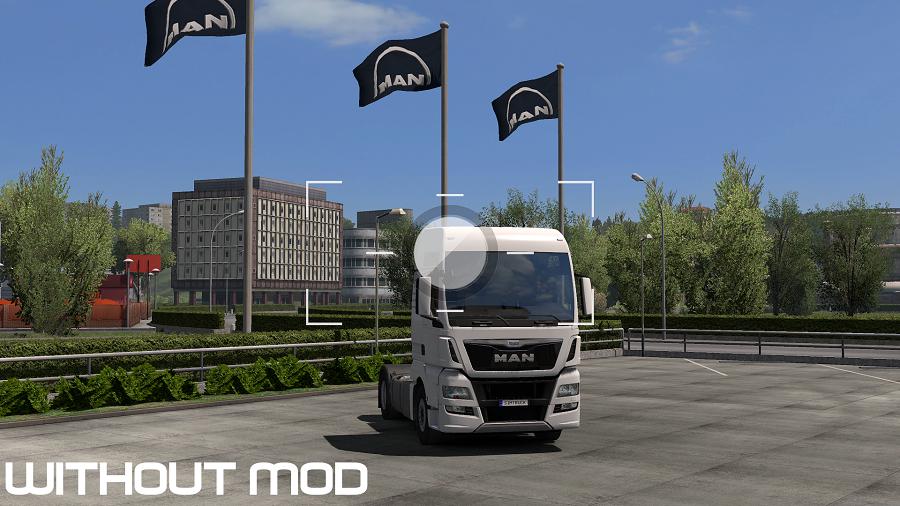
This is No Camera Symbol Mod. Generally the mod removes the symbols of the camera in the ingame Photo Studio, which occurs by holding the left mouse button clicked. So with this mod you can take pictures with the Photo Studio and with a SweetFX or a ReShade Shader enabled.
Just make your settings you wish with the Photo Studio, then hold left mouse button clicked and press the key that you have set in the SweetFX/ReShade settings. Now you get your screenshot with settings of the Photo Studio and SweetFX effect visible. Enjoy!
Installation:
To install this mod, just put the .scs file into your mod-folder of Euro Truck Simulator 2. In game activate the mod in the Mod-Manager. (Mod needs not a high priority)
Supported Game Versions:
“No Camera Symbol Mod” works on the latest game version 1.34.x description and picture
Credits:
SimTruck Design
If the download link is outdated or doesn't work, you can add your download link. (If your link is valid, we will approve it within 24 hours.)
– Updated the mod for game version 1.34 (mod works only on 1.34 now) – Updated manifest, description and picture1
This is No Camera Symbol Mod. Generally the mod removes the symbols of the camera in the ingame Photo Studio, which occurs by holding the left mouse button clicked. So with this mod you can take pictures with the Photo Studio and with a SweetFX or a ReShade Shader enabled.
Just make your settings you wish with the Photo Studio, then hold left mouse button clicked and press the key that you have set in the SweetFX/ReShade settings. Now you get your screenshot with settings of the Photo Studio and SweetFX effect visible. Enjoy!
Installation:
To install this mod, just put the .scs file into your mod-folder of Euro Truck Simulator 2. In game activate the mod in the Mod-Manager. (Mod needs not a high priority)
Supported Game Versions:
“No Camera Symbol Mod” works on the latest game version 1.34.x description and picture
Credits:
SimTruck Design
If the download link is outdated or doesn't work, you can add your download link. (If your link is valid, we will approve it within 24 hours.)
Download Links
Report a problem
No Camera Symbol Mod by SimTruck Design v 1.4
Advertisement
Remove ads