1 / 2
Trucker AUX
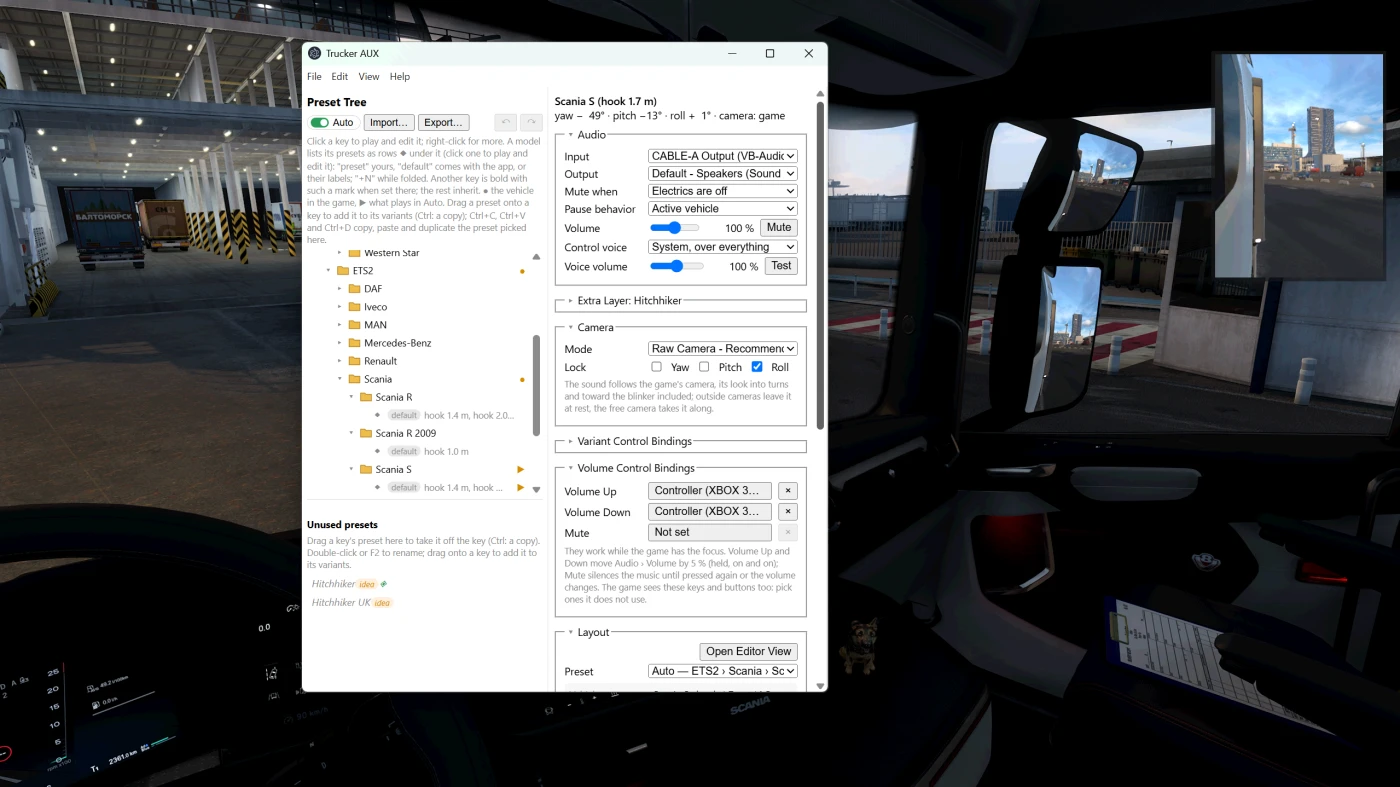
Trucker AUX plays any audio from your PC (Spotify, YouTube, a Discord call…) through virtual speakers inside your truck's cab. The speakers sit where real ones would, and the sound follows your head: look out of the side window and the door tweeter is now behind your ear.
Virtual audio cable driver required.
Features
Real head position: HRTF spatial audio synced with the in-game head. With the bundled camera plugin it also follows the game's look into turns and toward the blinker.
Any audio source: anything that can play into a virtual audio cable. Works with ETS2 Local Radio.
Ready presets for a long list of ATS and ETS2 trucks, switched automatically when you change trucks. Cabs of one model are told apart by the fifth-wheel position, and your own trucks are remembered by plate.
Visual editor: drag speakers on top and side views. Speaker types with crossovers: full range, small full range, tweeter, midrange, mid-bass, subwoofer.
Cab controls: keyboard or controller bindings to try preset variants while driving, plus Volume Up / Down and Mute.
Like a car radio (togglable): mutes while the engine or the electrics are off. A separate preset for the pause menu, with a smooth fade.
Extra layers: a second audio source from another seat at once, e.g. Discord through the "Hitchhiker" preset, like a passenger talking. Multiple virtual cables required.
Loudness matching between presets with different speaker counts.
Requirements
Windows 10 or 11
A virtual audio cable: VB-Audio Virtual Cable (free), Virtual Audio Cable (paid) or Steam Streaming Speakers
Plain stereo headphones. Turn virtual surround off (DTS Headphone:X, Windows Sonic, Dolby Atmos), or the sound gets virtualized twice.
Installation
Install a virtual audio cable.
VB-Audio - Has 1 free cable, extra cables (i.e. for routing your friend's Discord sound on Hitchhiker preset on top of sound system music) are dontaionware
Virtual Audio Cable - Paid
Steam Streaming Mic/Speakers - Installs automatically when setting up a Steam Link (Remote Play)
Download the latest release and extract it anywhere.
Run Trucker AUX → Help › Install game plugins (copies scs-telemetry.dll and trucker_aux_camera.dll into /bin/win_x64/plugins).
In the app: Input = the cable's output side, Output = your headphones.
In the Windows volume mixer, send your player to the cable's input.
Start the game, accept the SDK warning, drive.
Keeps clean
The game's shared memory is only opened for reading; the camera plugin only reads the game's camera, and a game update may switch it off until it's updated (the app falls back to telemetry).
Game files are never changed, except copying the plugins when you ask.
No sign-ins, no network except Help › Check for updates when you press it.
All data stays in the app's folder.
Built with AI (Claude)
I tuned the presets truck by truck on my own profile. Presets and feedback welcome on GitHub
Support the HQ mod-slop
Check out other free mods, or buy me a Red Bull on Boosty
Virtual audio cable driver required.
Features
Real head position: HRTF spatial audio synced with the in-game head. With the bundled camera plugin it also follows the game's look into turns and toward the blinker.
Any audio source: anything that can play into a virtual audio cable. Works with ETS2 Local Radio.
Ready presets for a long list of ATS and ETS2 trucks, switched automatically when you change trucks. Cabs of one model are told apart by the fifth-wheel position, and your own trucks are remembered by plate.
Visual editor: drag speakers on top and side views. Speaker types with crossovers: full range, small full range, tweeter, midrange, mid-bass, subwoofer.
Cab controls: keyboard or controller bindings to try preset variants while driving, plus Volume Up / Down and Mute.
Like a car radio (togglable): mutes while the engine or the electrics are off. A separate preset for the pause menu, with a smooth fade.
Extra layers: a second audio source from another seat at once, e.g. Discord through the "Hitchhiker" preset, like a passenger talking. Multiple virtual cables required.
Loudness matching between presets with different speaker counts.
Requirements
Windows 10 or 11
A virtual audio cable: VB-Audio Virtual Cable (free), Virtual Audio Cable (paid) or Steam Streaming Speakers
Plain stereo headphones. Turn virtual surround off (DTS Headphone:X, Windows Sonic, Dolby Atmos), or the sound gets virtualized twice.
Installation
Install a virtual audio cable.
VB-Audio - Has 1 free cable, extra cables (i.e. for routing your friend's Discord sound on Hitchhiker preset on top of sound system music) are dontaionware
Virtual Audio Cable - Paid
Steam Streaming Mic/Speakers - Installs automatically when setting up a Steam Link (Remote Play)
Download the latest release and extract it anywhere.
Run Trucker AUX → Help › Install game plugins (copies scs-telemetry.dll and trucker_aux_camera.dll into /bin/win_x64/plugins).
In the app: Input = the cable's output side, Output = your headphones.
In the Windows volume mixer, send your player to the cable's input.
Start the game, accept the SDK warning, drive.
Keeps clean
The game's shared memory is only opened for reading; the camera plugin only reads the game's camera, and a game update may switch it off until it's updated (the app falls back to telemetry).
Game files are never changed, except copying the plugins when you ask.
No sign-ins, no network except Help › Check for updates when you press it.
All data stays in the app's folder.
Built with AI (Claude)
I tuned the presets truck by truck on my own profile. Presets and feedback welcome on GitHub
Support the HQ mod-slop
Check out other free mods, or buy me a Red Bull on Boosty
Download Links
Report a problem
Trucker AUX
Advertisement
Remove ads