1 / 2
New External E-Log Beta v1.0 ATS
Euro Truck Simulator 2 Mods | American Truck Simulator Mods | August 17, 2025
New External E-Log Beta v1.0 ATS
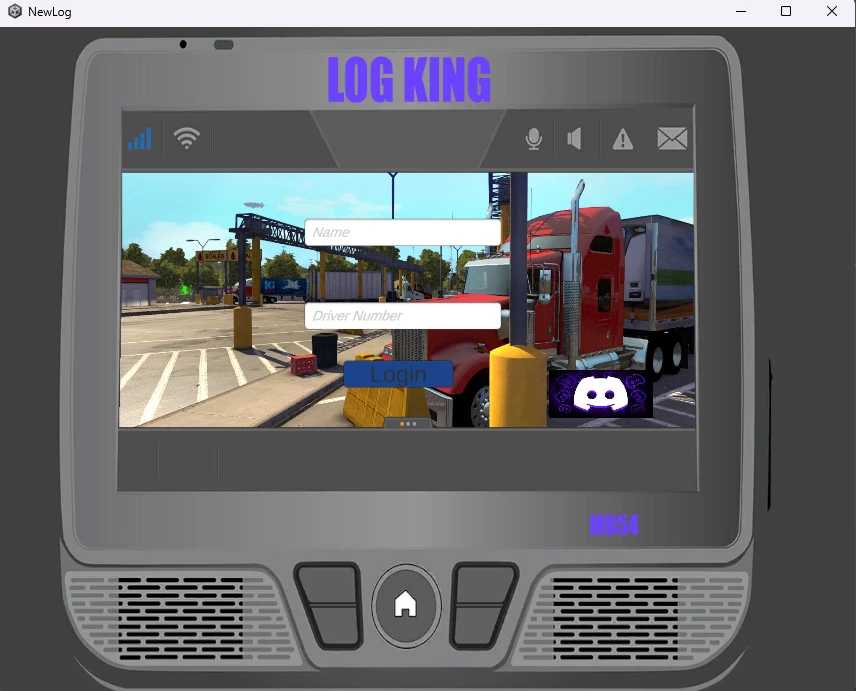
ELOG System Overview The ELOG System is a driver-friendly electronic logbook designed for Unity-based applications. It helps simulate or manage Hours of Service (HOS) tracking in a realistic and interactive way, built specifically with trucking, simulation, and fleet-based games or utilities in mind.
Key Features: Real-Time Duty Tracking Switch seamlessly between Driving, On Duty, Off Duty, Sleeper Berth, and Personal Conveyance. Each status accurately starts and stops the appropriate timers in compliance-style logic.
Smart Timer System Tracks key HOS limits:
8-hour On Duty Clock 70-hour Weekly Clock Automatic resets after 10 minutes off-duty (Driving) or 1 hour off-duty (70-hour)
Off-Duty Recovery Tracking The system monitors how long you’ve been off-duty and applies the proper logic for time resets—ideal for testing realistic time management.
Persistent Save System Your logs and duty status are automatically saved to your computer locally using Unity’s PlayerPrefs. When you exit and relaunch the application, your remaining time and current duty state are restored and adjusted based on real-world time passed.
Auto-Save Every 60 seconds, the ELOG automatically saves your progress—ensuring no lost time or data, even during unexpected closures.
Live Broadcast Panel Every time the driver changes duty status, it is broadcast in a message-style feed that includes:
Driver Name New Status
Timestamp (MM-DD-YYYY HH:MM:SS) This feed is displayed in a scrollable window and offers a quick visual history of status changes.
Multi-Page UI The system is organized with toggling pages for Main View, Trip Sheet, and Broadcast Log. (Note: Final log page layout is still in development and will be added in a future update.)
Data Storage All log data is stored locally on your device using Unity’s internal PlayerPrefs system. This includes:
Driver’s Name Time remaining on each clock Duty status Off-duty recovery time
Timestamp of last save If your PC is saying virus detected it’s is your Windows Defender or whatever anti virus software you are using
New External E-Log Beta v1.0 ATS
ELOG System Overview The ELOG System is a driver-friendly electronic logbook designed for Unity-based applications. It helps simulate or manage Hours of Service (HOS) tracking in a realistic and interactive way, built specifically with trucking, simulation, and fleet-based games or utilities in mind.
Key Features: Real-Time Duty Tracking Switch seamlessly between Driving, On Duty, Off Duty, Sleeper Berth, and Personal Conveyance. Each status accurately starts and stops the appropriate timers in compliance-style logic.
Smart Timer System Tracks key HOS limits:
8-hour On Duty Clock 70-hour Weekly Clock Automatic resets after 10 minutes off-duty (Driving) or 1 hour off-duty (70-hour)
Off-Duty Recovery Tracking The system monitors how long you’ve been off-duty and applies the proper logic for time resets—ideal for testing realistic time management.
Persistent Save System Your logs and duty status are automatically saved to your computer locally using Unity’s PlayerPrefs. When you exit and relaunch the application, your remaining time and current duty state are restored and adjusted based on real-world time passed.
Auto-Save Every 60 seconds, the ELOG automatically saves your progress—ensuring no lost time or data, even during unexpected closures.
Live Broadcast Panel Every time the driver changes duty status, it is broadcast in a message-style feed that includes:
Driver Name New Status
Timestamp (MM-DD-YYYY HH:MM:SS) This feed is displayed in a scrollable window and offers a quick visual history of status changes.
Multi-Page UI The system is organized with toggling pages for Main View, Trip Sheet, and Broadcast Log. (Note: Final log page layout is still in development and will be added in a future update.)
Data Storage All log data is stored locally on your device using Unity’s internal PlayerPrefs system. This includes:
Driver’s Name Time remaining on each clock Duty status Off-duty recovery time
Timestamp of last save If your PC is saying virus detected it’s is your Windows Defender or whatever anti virus software you are using
Visit Original Post
Also posted on
Download Links
Report a problem
New External E-Log Beta v1.0 ATS
Advertisement
Remove ads