1 / 35
Lowboy trailers by Eddie Yantz v1.49b ATS
Euro Truck Simulator 2 Mods | American Truck Simulator Mods | December 19, 2023
Lowboy trailers by Eddie Yantz v1.49b ATS
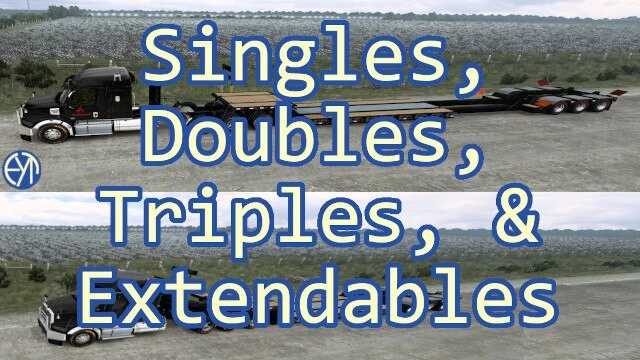
Changes 1.49b Added Sineptorro’s Big Bud 600 Ownable, Stand-alone Lowboy trailers: Singles, Doubles, & Triples [30-80T] Ownable, Stand-alone, Extendable Lowboy trailers: 0+3+0 and 0+3/3+0 [60T] (based loosely on Fontaine Magnitude 60HD-MX).
!! CARGO !! – this mod contains NO cargo; you must use with either CARGO Option #1 or #2 (or both). CARGO Option #1: “More Cargo for Lowboy“ CARGO Option #2: – “American Truck Simulator – Special Transport” DLC – Source and Destination locations have not been vetted; some may be ‘difficult.’ – Cargo names that contain “” may hit bridges – be careful.
Notes: – Purchase ONLY the normal trailer configuration marked “OWN” (“F7” configurations are included). – Use “Adjust Trailer” (F7) to swap among configurations. – (Tiny garages don’t play nicely with the Extendable Long and Oversize trailer configurations.)
Instructions: – use/attach your trailer, – select your cargo in the Cargo Market (Take Job), noting what trailer config you’ll need (normal, WIDE, LONG, OVERSIZE), – drive to a safe location near the source company; before taking the job, Adjust Trailer (navigation route will disappear when F7, so remember what you’re doing); (you can F7 after you’ve triggered the cargo icon to view cargo, just don’t TakeJob if you want to F7.)
Lowboy trailers by Eddie Yantz v1.49b ATS
Changes 1.49b Added Sineptorro’s Big Bud 600 Ownable, Stand-alone Lowboy trailers: Singles, Doubles, & Triples [30-80T] Ownable, Stand-alone, Extendable Lowboy trailers: 0+3+0 and 0+3/3+0 [60T] (based loosely on Fontaine Magnitude 60HD-MX).
!! CARGO !! – this mod contains NO cargo; you must use with either CARGO Option #1 or #2 (or both). CARGO Option #1: “More Cargo for Lowboy“ CARGO Option #2: – “American Truck Simulator – Special Transport” DLC – Source and Destination locations have not been vetted; some may be ‘difficult.’ – Cargo names that contain “” may hit bridges – be careful.
Notes: – Purchase ONLY the normal trailer configuration marked “OWN” (“F7” configurations are included). – Use “Adjust Trailer” (F7) to swap among configurations. – (Tiny garages don’t play nicely with the Extendable Long and Oversize trailer configurations.)
Instructions: – use/attach your trailer, – select your cargo in the Cargo Market (Take Job), noting what trailer config you’ll need (normal, WIDE, LONG, OVERSIZE), – drive to a safe location near the source company; before taking the job, Adjust Trailer (navigation route will disappear when F7, so remember what you’re doing); (you can F7 after you’ve triggered the cargo icon to view cargo, just don’t TakeJob if you want to F7.)
Visit Original Post
Also posted on
Download Links
Report a problem
Lowboy trailers by Eddie Yantz v1.49b ATS
Advertisement
Remove ads