Freightliner Cascadia Dashboard Add-on 1.00 – DACOVA MODDING
Freightliner Cascadia Dashboard Add-on 1.00 | DACOVA MODDING
Created by Dacova | Dacova Modding
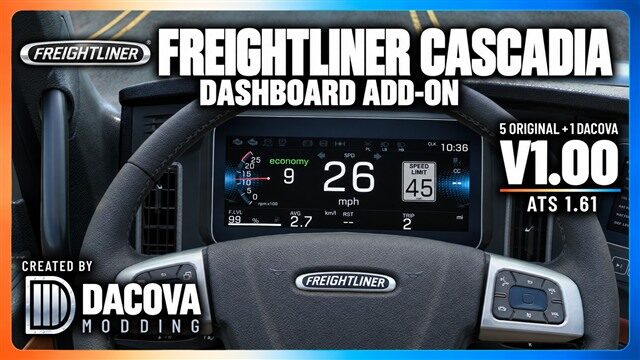
A sixth instrument page with larger readouts, while keeping the five original pages. Switch pages using the usual dashboard computer control.
A large digital speedometer, an RPM gauge on the left, and a nearby gear display. The US speed limit sign has a gray background to reduce glare, and the cruise-control speed is shown in green. Trip distance, average fuel consumption, fuel level, rest time, and the in-game clock are prominently displayed.
The dashboard includes lighting, turn signal, brake, and warning indicators. The active engine brake and retarder are shown in red.
Compatibility and installation:
For American Truck Simulator. Development baseline: ATS 1.61.
Compatible with the stock Cascadia 2019 and 2024 digital dashboards, including the 72 Sleeper RR. Analog interiors are not modified.
Enable the mod in Mod Manager and reload your profile. Disable older versions and any other mods that replace the digital dashboard of the same truck. The Western Star and Cascadia add-ons can be used together.
The mod is optional in Convoy when the server allows optional mods.
TRIP shows the distance traveled since the manual reset, not the remaining delivery distance. Resetting trip information also resets average fuel consumption. The transmission mode uses the gearbox’s own label, such as economy/manual; it does not necessarily indicate the adaptive Power/Normal setting.
Some indicators depend on the truck’s equipment and signals from the game. The speedometer does not automatically turn red when you exceed the speed limit. Check the game’s unit preferences. No real-world clock or real-time delivery ETA is included.
Load order: Place this mod above any other mod that changes the Freightliner Cascadia dashboard, GPS, or onboard computer. It must have higher priority, or another mod may overwrite the Dacova screen.
Layout and adaptation: Dacova / Dacova Modding.
Game and original assets: SCS Software.
Site: https://www.dacova.com.br
YouTube: https://www.youtube.com/@DacovaNaEstrada
Credits: Dacova
Created by Dacova | Dacova Modding
A sixth instrument page with larger readouts, while keeping the five original pages. Switch pages using the usual dashboard computer control.
A large digital speedometer, an RPM gauge on the left, and a nearby gear display. The US speed limit sign has a gray background to reduce glare, and the cruise-control speed is shown in green. Trip distance, average fuel consumption, fuel level, rest time, and the in-game clock are prominently displayed.
The dashboard includes lighting, turn signal, brake, and warning indicators. The active engine brake and retarder are shown in red.
Compatibility and installation:
For American Truck Simulator. Development baseline: ATS 1.61.
Compatible with the stock Cascadia 2019 and 2024 digital dashboards, including the 72 Sleeper RR. Analog interiors are not modified.
Enable the mod in Mod Manager and reload your profile. Disable older versions and any other mods that replace the digital dashboard of the same truck. The Western Star and Cascadia add-ons can be used together.
The mod is optional in Convoy when the server allows optional mods.
TRIP shows the distance traveled since the manual reset, not the remaining delivery distance. Resetting trip information also resets average fuel consumption. The transmission mode uses the gearbox’s own label, such as economy/manual; it does not necessarily indicate the adaptive Power/Normal setting.
Some indicators depend on the truck’s equipment and signals from the game. The speedometer does not automatically turn red when you exceed the speed limit. Check the game’s unit preferences. No real-world clock or real-time delivery ETA is included.
Load order: Place this mod above any other mod that changes the Freightliner Cascadia dashboard, GPS, or onboard computer. It must have higher priority, or another mod may overwrite the Dacova screen.
Layout and adaptation: Dacova / Dacova Modding.
Game and original assets: SCS Software.
Site: https://www.dacova.com.br
YouTube: https://www.youtube.com/@DacovaNaEstrada
Credits: Dacova
Download Links
Report a problem
Freightliner Cascadia Dashboard Add-on 1.00 – DACOVA MODDING
Advertisement
Remove ads