1 / 3
Backing & Lane Prediction – ATS
Backing & Lane Prediction – ATS
Now also available for ETS2: Backing & Lane Prediction – ETS2. The same plugin works with both games.
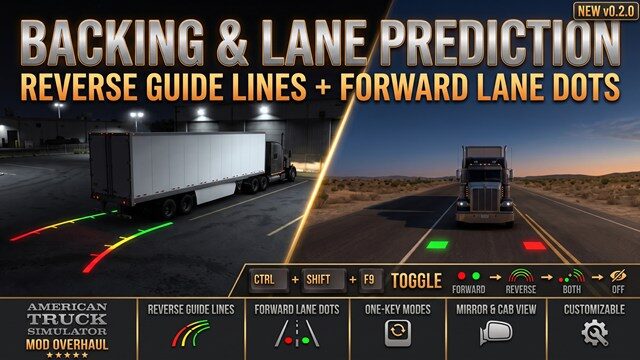
This mod adds backup-camera-style guide lines for reversing and a forward line to help you judge your position in the lane. While you are in reverse, two lines are drawn on the ground from the rear corners of your trailer—or your truck when bobtailing—along the path it will actually take:
– Red for the first 3 m, yellow up to 8 m, and green out to 15 m, with ticks at the color-change points – The lines are real objects in the game world, so they appear in every camera view and in the mirrors – They follow your actual wheel angles, including different steering locks, lift axles, and multi-steer trucks – Supports single trailers, doubles, and triples, including self-steering trailer axles – Distances and line height can be adjusted in a settings file
Forward line for lane position
In a forward gear, a light, translucent blue line runs along the road from the middle of your front axle, following the path the truck will take and curving with the steering. It is 25 m long at low speeds and extends up to 40 m at highway speeds. At speed, it follows the truck’s actual turn so it stays accurate on long bends. Keep the line in the middle of your lane. Trailers are ignored because they follow inside the truck’s path.
Keyboard shortcut: Ctrl+Shift+F9
Each press switches to the next mode. The shortcut works only while the game window has focus:
– Forward line only – Reverse lines only – Both: the forward line in a forward gear and guide lines in reverse – Nothing: everything hidden
After the last mode, the next press returns to forward line only. Your choice is remembered between games; the first time you start the game, the mode is set to Both. You can set a different key in the section of the settings file.
Updating? Run the new Install.bat to install the plugin. If you are upgrading from plugin version 0.3.0 or older, you need the update to use the blue line. Older plugins continue to work with this mod.
Open source (MIT): Read the full README, user guide, and source code on GitHub before installing. Search for “Backing & Lane Prediction” on GitHub.
Installation
Both parts are needed:
The models alone do not draw the lines. When you start the game with the plugin installed, you will see a notice about “advanced SDK features.” This is expected.
Requirements
– American Truck Simulator 1.61 – Windows 64-bit
Settings and troubleshooting
Settings file: DocumentsAmerican Truck Simulatorats_reverse_overlay.ini. It is created on first start, and changes apply while driving.
Log file: DocumentsAmerican Truck Simulatorats_reverse_overlay.log. The first lines show whether the plugin found what it needs for your game version and which mode the shortcut is set to.
If no lines appear, check that the DLL is in binwin_x64plugins.
Credits: Telemichus
Now also available for ETS2: Backing & Lane Prediction – ETS2. The same plugin works with both games.
This mod adds backup-camera-style guide lines for reversing and a forward line to help you judge your position in the lane. While you are in reverse, two lines are drawn on the ground from the rear corners of your trailer—or your truck when bobtailing—along the path it will actually take:
– Red for the first 3 m, yellow up to 8 m, and green out to 15 m, with ticks at the color-change points – The lines are real objects in the game world, so they appear in every camera view and in the mirrors – They follow your actual wheel angles, including different steering locks, lift axles, and multi-steer trucks – Supports single trailers, doubles, and triples, including self-steering trailer axles – Distances and line height can be adjusted in a settings file
Forward line for lane position
In a forward gear, a light, translucent blue line runs along the road from the middle of your front axle, following the path the truck will take and curving with the steering. It is 25 m long at low speeds and extends up to 40 m at highway speeds. At speed, it follows the truck’s actual turn so it stays accurate on long bends. Keep the line in the middle of your lane. Trailers are ignored because they follow inside the truck’s path.
Keyboard shortcut: Ctrl+Shift+F9
Each press switches to the next mode. The shortcut works only while the game window has focus:
– Forward line only – Reverse lines only – Both: the forward line in a forward gear and guide lines in reverse – Nothing: everything hidden
After the last mode, the next press returns to forward line only. Your choice is remembered between games; the first time you start the game, the mode is set to Both. You can set a different key in the section of the settings file.
Updating? Run the new Install.bat to install the plugin. If you are upgrading from plugin version 0.3.0 or older, you need the update to use the blue line. Older plugins continue to work with this mod.
Open source (MIT): Read the full README, user guide, and source code on GitHub before installing. Search for “Backing & Lane Prediction” on GitHub.
Installation
Both parts are needed:
The models alone do not draw the lines. When you start the game with the plugin installed, you will see a notice about “advanced SDK features.” This is expected.
Requirements
– American Truck Simulator 1.61 – Windows 64-bit
Settings and troubleshooting
Settings file: DocumentsAmerican Truck Simulatorats_reverse_overlay.ini. It is created on first start, and changes apply while driving.
Log file: DocumentsAmerican Truck Simulatorats_reverse_overlay.log. The first lines show whether the plugin found what it needs for your game version and which mode the shortcut is set to.
If no lines appear, check that the DLL is in binwin_x64plugins.
Credits: Telemichus
Visit Original Post
Also posted on
Download Links
Report a problem
Backing & Lane Prediction – ATS
Advertisement
Remove ads